

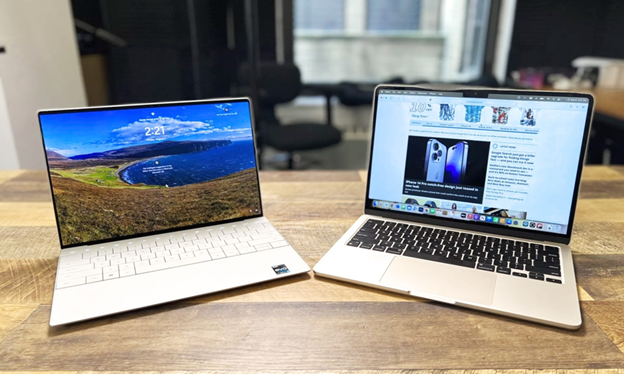
The MacBook Air M3 and XPS 13 are now two of the hottest ultraportables on the market, offering high-speed performance, long battery life, and the convenience of a compact workstation that can be taken anywhere. On paper, they are aimed at the same buyers: students, road warriors, and creators who are interested in light chassis and long uptime. However, in reality, raw spec sheets do not make the whole story. Daily experience is determined more by thermals, sustained performance under load, software ecosystem, I/O, and battery endurance than single-run benchmark numbers. In this practical comparison, I dissect the performance of the MacBook Air M3 and Dell XPS 13 in daily activities, including productivity, content creation, media playback, connectivity, and workload-heavy tasks, so that you can choose the machine that will actually feel more comfortable on your lap and in your workflow.
Design and build: light vs polished precision
The two laptops fall squarely in the same category of premium lightweight, but in different ways. The MacBook Air M3 also maintains the wedge-thin, fanless DNA of the Air models, crafted from an aluminum unibody that is rigid yet whisper-light, making it easy to throw into a backpack during lengthy commutes. The Dell XPS 13 shares the same high-quality metal feel and tight tolerances, but tends to focus on a more practical, boxy appearance and exhibits slight variations in surface finish and port options across models. In practice, this translates to the Air being immediately recognizable in the event that you have previously used MacBooks: smooth, minimal, and homogeneous. However, the XPS can be a bit denser and otherwise well-crafted. Both have continuously been commended by review testing as being constructed of premium quality and being portable.
Display and speakers: color and immersion
Display options are crucial for editing photos, watching videos, or having multiple spreadsheet windows side by side. Apple also equips the M3 Air with a superb Liquid Retina display that is optimized for accurate colors and sharp text, making it great for creative tasks and extended reading hours. The Dell XPS 13 often features high-quality displays, such as colorful OLED or bright IPS options that can be sharper and brighter than those of competitors, particularly in the premium-priced XPS models. Apple machines typically have speakers that are usually set to produce a fuller sound due to their thin chassis, whereas Dell XPS models have generally offered better audio over the last few generations, although this may depend on the specific configuration. To a slight extent, the MacBook will outperform in terms of screen fidelity and consistent out-of-the-box color, whereas the XPS may win when you prefer the OLED power of an option, depending on the panel you choose.
Everyday performance: snappy single-core, efficient multitasking
When it comes to daily activities such as web browsing, document editing, using Slack, and other short tasks like photo editing, both laptops are perceived as instant, in contrast to older mainstream models. In reviews, the Apple M3 is single-threaded, responsive, and can run popular applications with extremely low latency, resulting in faster application load times and reduced system animations. Even with the XPS 13, in the versions that take either the newer Intel Lunar Lake or Snapdragon options, the snapperiness is equally impressive, as is the endurance under sustained load on multiple threads, depending on the CPU option used. Even in short interactive tasks, there is little chance of a performance delay on either machine, but the M3 has been recording high single-core benchmark scores, which could be the reason behind the smoothness of macOS.
Sustained workloads and thermals: where differences show up
Here, the two are as different as possible. The MacBook Air M3 features a fanless design and low power consumption, along with a highly efficient chip that enables it to excel in short bursts and moderate loads. However, after prolonged, heavy loads such as large video exports, long compilation jobs, or extensive benchmark tests, thermals and sustained clock speeds become the bottleneck. A fanless system will have the ability to throttle down softly to maintain reasonable temperatures, thereby maintaining comfort while reducing sustained throughput. The XPS 13 by Dell, depending on the CPU (with some models featuring newer Lunar Lake or Snapdragon/X /X/X/X Elite options), typically has active cooling, which enables it to sustain higher sustained clock speeds over longer periods. Several practical reports suggested that XPS could potentially provide more stable long-term performance and cooler external surfaces in certain setups, particularly during long, CPU-intensive workflows. The XPS would be advantaged in sustained workloads, particularly in cases of long-form rendering or compile-heavy work.
Battery life and charging: marathon vs all-day use
A significant real-life consideration is battery life. The M3 Air from Apple has been highly acclaimed for its outstanding battery life, which in practice reaches all-day runtime in real-life usage situations and often exceeds many Windows competitors on similar usage patterns. The recent generations of the XPS 13 have made significant improvements by Dell. Some of the models, especially those with ARM-like Snapdragon processors or the newer low-power Intel models, also have extremely long run times, which is particularly notable in many practical situations, outperforming the MacBook Air in many cases. The bottom line is that each of them can be used all day, but Apple consistently delivers a slightly better result in numerous mixed-use tests with the M3 Air. Additionally, certain XPS models can perform equally or better than the Apple model, depending on the screen selection and workload.
User Experience and Software Ecosystem: Mac vs. Windows
Alongside raw figures, OS defines the daily productivity. macOS on the M3 Air is very cohesive, with ideal optimization of applications and other features, such as tight memory management and system-level efficiency, which further ensures extended battery life and responsiveness. Windows on the XPS 13 offers flexibility, a broader range of apps that can be used, and greater customization for power users. You may find the XPS more comfortable if you are using Windows software that is not compatible with other popular systems or requires special enterprise features. Alternatively, the MacBook Air may be more impressive in a system with an easy-to-use office and smooth applications that help with creativity. Select the platform that best fits your workflow, as changing ecosystems can be more expensive than the performance difference between these machines.
Connection And Ports: Real-Life
The choice of the port may seem significant. The M3 models of MacBook Air typically include only a few high-speed USB-C/Thunderbolt connections, while many models still feature the MagSafe charging option. In contrast, the XPS 13 offers a slightly different combination of USB-C, Thunderbolt ports on Intel models, and occasionally full-size USB or microSD options, depending on the model. When using frequent external displays, docks, or peripherals, consult the specific SKU, as the convenience of a particular solution may require the use of dongles or a one-cable dock. Neither of these is a port-heavy workstation per se; both are based on modern and small connections.
Value And Pricing: Make A Choice, Not A Hype Choice
Value is an elusive target because of price changes, promotions, and configuration options. Apple is also likely to maintain a narrow pricing range on all configurations and has a high resale value, whereas Dell often conducts aggressive sales and offers more configuration choices that can potentially put Apple under pressure. For long-term resale, with its tightly integrated macOS and slightly more reliable out-of-the-box battery life, the MacBook Air M3 is a fantastic choice. If you require continuous high loads of work, a specific display type, and the ability to bend in directions of Windows, as well as occasional sales, then the XPS 13 can be a better value in certain situations. Choose RAM and storage wisely when buying the laptop; neither has a great deal of upgradeability later in its life.
Conclusion
The MacBook Air M3 and the Dell XPS 13 both offer the best ultraportable experiences, but they cater to differing priorities. The MacBook Air M3 is recommended when you need stunning single-threaded performance, incredible running time on mixed usage, an elegant macOS experience, and an all-silent and whisper-quiet design that is perfect for day-to-day creative and work activities. Use the Dell XPS 13 when you require longer system life during demanding, CPU-intensive tasks, need the ability to use a wide range of Windows software, or have a specific display feature (such as OLED) and take advantage of occasional promotional discounts that enhance its utility. However, it all depends on real-world performance, which is a combination of chip architecture, thermal design, display options, and software. So, balance the machine to the way you actually work, not just the brand you like. I can compare two particular specifications (RAM, storage, display) against each other and display approximate variations in battery and thermal performance based on published lab results.

